

Kitchen SLA Telemetry, PWA Digital Stamp & VIP Cards, and Recipe Stock Variance
Kitchen prep SLA telemetry, waiter Ready-Bell, table QR pay, PWA digital stamp & VIP cards, BOM stock variance, hourly timers, salon & laundry tools.
Sell fast, keep stock honest, run the kitchen and follow it all from your phone. Switch on only what you use.
Made for Groceries & minimarkets Cafés & restaurants Laundry & dry cleaning Tailoring Repair shops Perfume & oud Roasteries & spices Buy once (desktop)

Four things on CreekPOS are called AI: reading a crumpled supplier invoice, your AI answering in Ask your shop (coming soon), the AI Front Desk on your WhatsApp (coming soon), and the AI you already use, connected with a read-only key. Everything else works from exact figures.
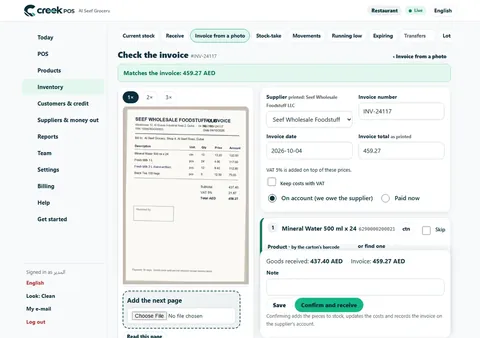
Photograph a supplier's invoice or delivery note. An AI model reads the photo, and the stock receipt is filled in for you: the supplier, the invoice number, every line matched to your products, the quantities and the costs.
Nothing is saved until you press Confirm and receive.
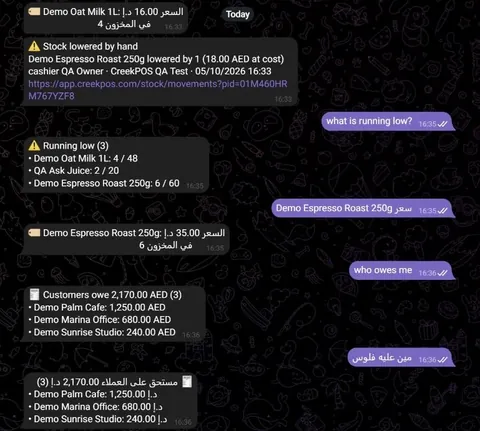
Type a question in plain English, Arabic, Hindi or Urdu, or in Latin letters like “aaj ki bikri”, in the back office, on the till or in Telegram. The usual questions are answered from your own data by fixed rules.
The usual questions never guess a number; your AI's answers say “Based on” and which report.
Connect Claude, ChatGPT, Gemini or any MCP assistant to your shop in one click with a read-only key — via the creekpos.mcpb Desktop Extension, portable skill.md, or /.well-known/mcp.json discovery.
Platinum and Chain plans.

Your shop's WhatsApp answers customers from your own menu, prices and stock, takes orders and bookings, understands voice notes and photos, and hands over to your staff.
The AI Front Desk will be an add-on of Platinum and Chain; its price is set when it opens.

01Sell
The till, payments and receipts — plus job tickets for shops that take things in, and your products from your old system.

New in CreekPOS Online

1-Click Migration from your previous POS or Excel/CSV: bring products, customers, suppliers, opening balances and stock with ready layouts — and undo for 30 days.
From Gold
How it works
Layaway / Tailoring Deposit Orders for laundries, tailors, abaya boutiques and repair shops: a numbered ticket, deposit, status board, customer tracking page and ready message.
From Gold
How it works
One click fills a new shop with products, customers and 25 days of receipts of its own kind; one click takes exactly that sample out again.
Every plan
How it works
29,274 products sold in the Gulf, 23,485 of them with a picture: scan or search, and the name, category and picture come in.
In CreekPOS Online and the desktop program
Product data: Open Food Facts, ODbL · Pictures: Open Food Facts contributors, CC BY-SA 3.0 · Credits
How it works
The buy-once program takes job tickets with deposits for laundries, tailors and repairs, and keeps the credit book with polite WhatsApp reminders.
Silver (program) and up
How it worksAlso in this group
01Selling
Big buttons, one search box and a scanner that just works — by touch, mouse or keyboard.
Included in Online Every plan Program Every edition

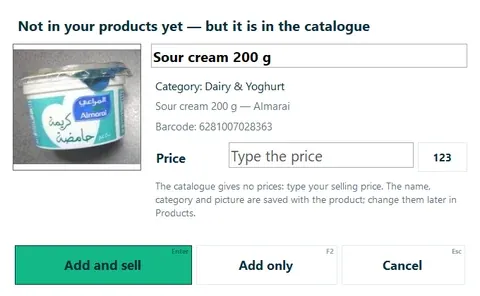
UAE catalogue: product data © Open Food Facts contributors, under the Open Database Licence. openfoodfacts.org · ODbL 1.0
01Promotions
Set the rule once: the till applies supermarket BOGO, mix-and-match and happy-hour offers automatically, the receipt shows them and reports count them.
Included in Online Every plan Program Gold · Platinum
01Devices
Ordinary printers, drawers and scanners from any computer shop. Nothing proprietary.
Included in Online Every plan Program Every edition

01Languages & VAT
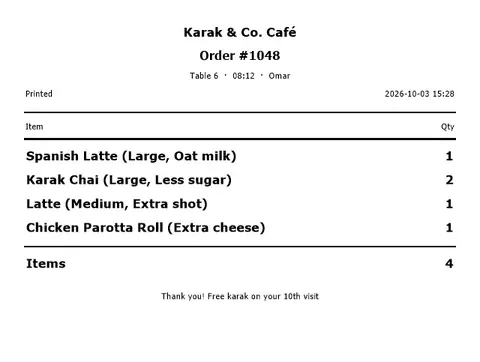
Each cashier picks a language; receipts can carry two, and your UAE tax numbers stay ready.
Included in Online Every plan Program Every edition
We are not tax advisors: CreekPOS gives you the fields and the printouts; your accountant tells you how to use them.
UAE e-invoicing: what changes, when, and what CreekPOS plans

02Online shop
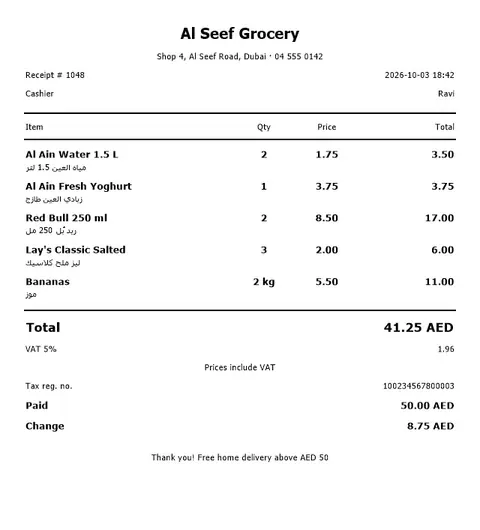
An online shop, an online menu and QR ordering at the table, fed by the till's own products, prices and stock.

New in CreekPOS Online

Your shop's WhatsApp answers customers, takes orders and bookings from your own menu, prices and stock, and hands over to your staff when it should.
An add-on of Platinum and Chain; its price is set when it opens
Learn more
It answers from your notes and catalogue, lists what it could not answer, remembers your regulars, opens cases for your team and checks its replies.
With the AI Front Desk add-on
How it works
Your products, prices and stock from the till on a shop page in your name; orders arrive at the till. Cash on delivery or pickup.
Platinum and Chain of both lines; an add-on on Silver and Gold
How it works
Your menu with pictures and prices at your own web address, to share or print as a QR code.
F&B Gold and up; an add-on on F&B Silver (not in the shops line)
How it works
Guests scan the table's code, order, call the waiter and ask for the bill; your staff confirm each order.
F&B Gold and up; an add-on on F&B Silver (not in the shops line)
How it works03Restaurant
Orders reach the kitchen, numbers reach the TV, and the menu board updates itself.
New in CreekPOS Online

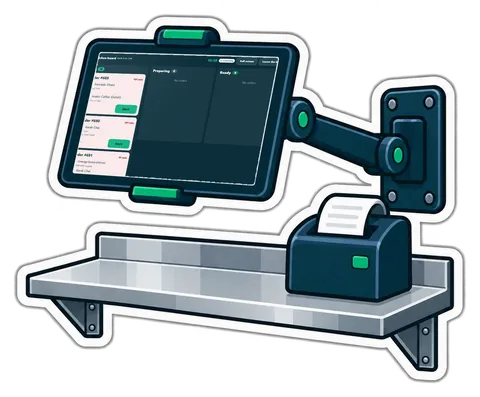
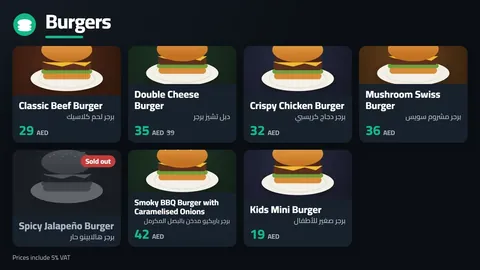
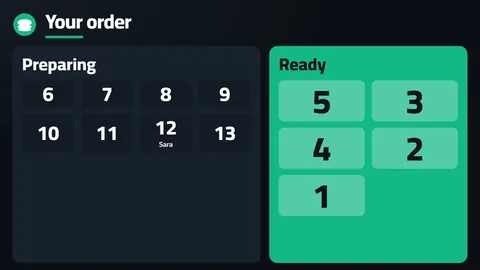
Your menu on any TV with live prices and sold-out items, and a Preparing / Ready screen that shows the order numbers.
Platinum and Chain plans
How it works
Between the menu pages, the team's top three of the day, week or month: first names and medals, the amounts hidden unless you show them.
Platinum and Chain plans
How it worksAlso in this group
03Kitchen & tables
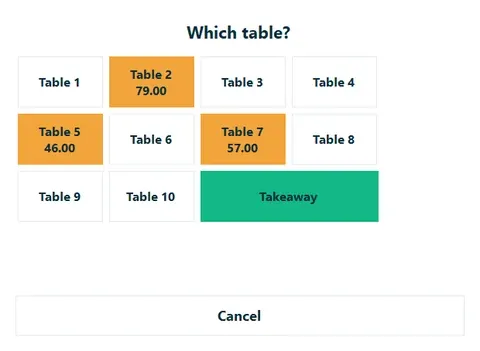
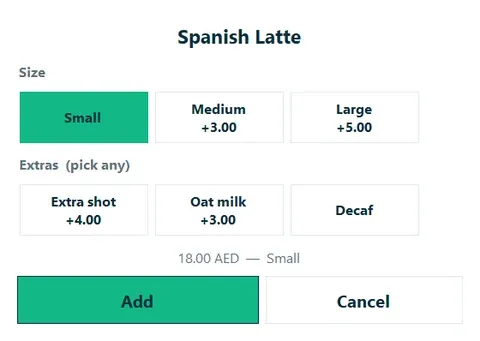
Sizes and add-ons on the till, Kitchen QA prep-stage SLA telemetry, Hourly Table & Gaming Lounge Timer, and waiter Ready-Bell — one flow.
Included in Online Platinum · Chain Program Gold · Platinum

03Recipes & food cost
Link a product to its BOM ingredients, audit Theoretical vs. Actual Stock Variance, rank dishes on the menu matrix and guard margins across Multi-Tier Price Lists.
Included in Online Every plan Program Gold · Platinum

04Retail & stock
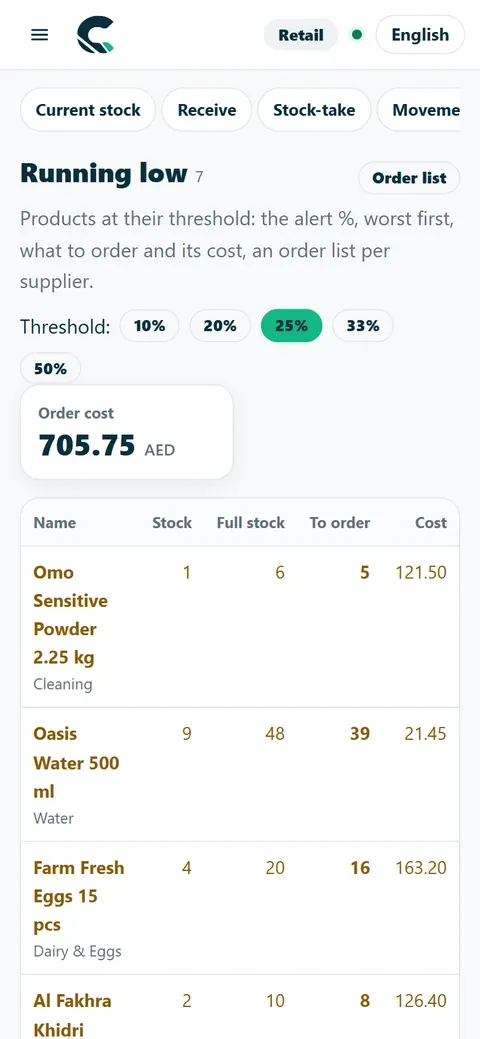
Reorder by the numbers, stop expiry losses, sell by weight and volume, see the margin a cost rise takes and the money on slow shelves, and let AI type in your supplier invoices.
New in CreekPOS Online

What to buy today, per supplier, each line with its reason — then a purchase order to print, e-mail or send on WhatsApp.
From Gold
How it works
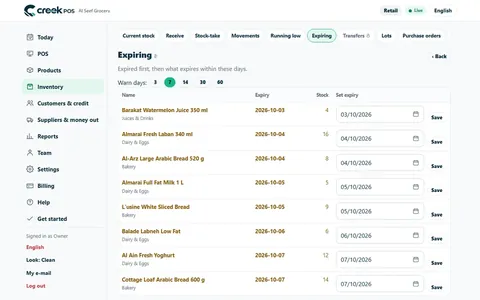
A board of the lots near their date, markdowns you approve, expired lots blocked at the till and a waste report.
From Gold
How it works
Grams, kilos, millilitres or the tola; Scale Price/Weight Barcode Calibrator, tare, custom blends and roast or pack batches — for groceries, perfume shops, roasteries, spices and sweets.
From Gold
How it works
Photograph a supplier's invoice: an AI model reads it and fills in the stock receipt. The software checks every sum and you confirm before anything is saved.
A few readings a month included in paid plans; 2 to try during the trial
How it works
When a supplier's cost creeps up, see the margin you just lost, maintain Multi-Tier Price Lists (Dine-In, Takeaway, VIP Room, In-House Delivery, Wholesale) with a Packaging Margin Guard, and apply new selling prices in one tap.
Every online plan; Silver (program) and up
Learn more
What has not sold in 45 days, the money it holds, and what to do: discount, bundle, return to the supplier or stop reordering.
Every online plan; Silver (program) and up
How it works
Beside each slow product: the branches where it does sell, their days of cover and how many to move, then one transfer note.
Shops with two or more branches
How it works
Photograph a supplier's price list: the AI invoice reader reads it, you review the cost changes and the prices that keep your margin, and apply.
With the AI invoice reading (in pilot)
How it works04Stock & expiry
Stock moves with every sale, so the lists you need are always ready.
Included in Online Every plan Program Every edition
05Customers & credit
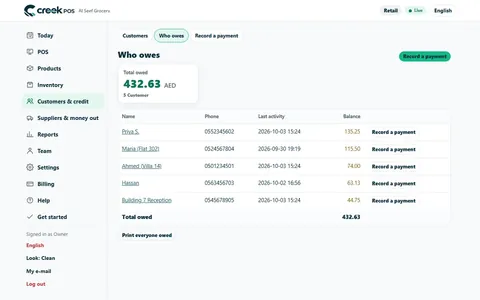
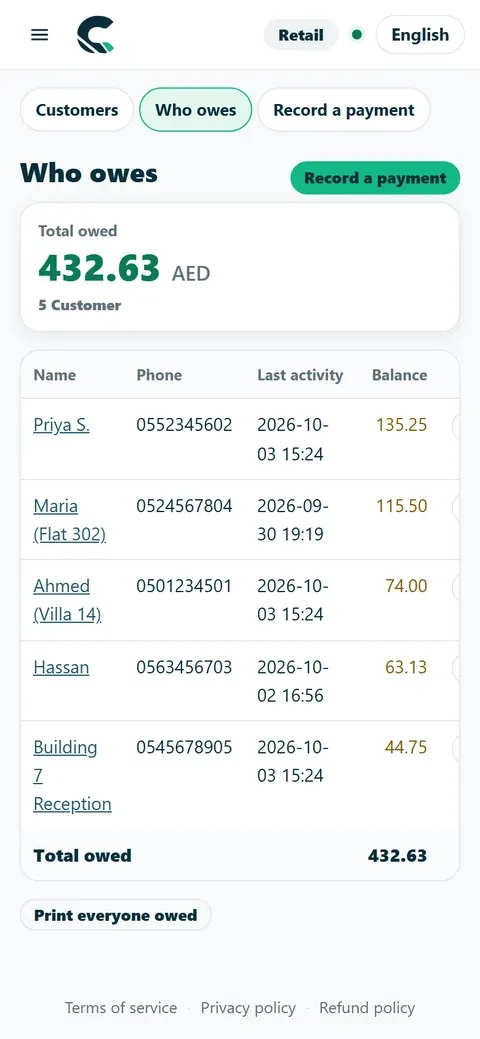
Know who owes you, collect it politely, sell on a schedule, and bring customers back with reviews, the receipt page and the stamp card in their wallet (coming soon).

New in CreekPOS Online

Everyone who owes you, since when and how late, with polite reminders by e-mail or WhatsApp and a link to their statement.
From Gold
How it works
Sell on a schedule or take a Layaway / Tailoring Deposit Order; the till prints the plan, and one list shows what is due and overdue.
From Gold
How it works
“Buy 9, the 10th is free” on the customer's phone — no app to install, no paper card to lose.
From Gold
How it works
Paste your Google review link once: every sale receipt ends with “Happy with us? Scan to rate us” and a QR code.
Every plan, online and the desktop program
Learn more
From the receipt link, the customer refills the online shop's cart at today's prices, or shows a QR the cashier scans to ring it up again.
Every plan; into the online shop where it is switched on
How it works
The customer asks for a return or asks a question from the receipt page; it lands in the till's Customer requests and staff accept, decline or reply.
Every online plan
How it works
The stamp card goes into the phone's wallet with one tap and updates itself after every visit. No app, no login.
From Gold
How it works
A private place for customers to find purchases, documents, support and service updates.
AED 69 per workspace per month, before VAT. Separate purchase; not included in a base plan or its free trial. Buy in Billing → Plan, then enable it in Settings → Modules.
Learn more
Run business-to-business orders with agreed prices, pack sizes, credit controls, partial deliveries and returns, using the customers and stock you already have.
AED 129 per workspace per month, before VAT.
Learn more
A shared product directory for shops and suppliers: search products, compare unit prices and delivery terms, then turn an agreed request into a purchase order.
Browsing and supplier listings: no additional module fee. Trade purchasing is a separate paid add-on.
Learn more05Customers & loyalty
Sell on account without the notebook, take layaway deposits, sell Prepaid Digital Coupon Books, and issue Instant Mobile Browser PWA Digital Stamp & VIP Cards.
Included in Online Every plan Program Every edition
06Staff & HR
Clock-in and timesheets on the till, commission and advances, and HR with payroll and the UAE WPS file.

New in CreekPOS Online

Clock in and out with a PIN, timesheets with overtime, sales commission and staff advances.
Clock-in and timesheets from Gold; commission and advances from Platinum
How it works
Employee files, document expiry reminders, leave, the roster, attendance devices, payroll with payslips and the UAE WPS salary file.
Files, leave and roster from Gold; payroll and WPS on Platinum and Chain
How it works
Employee files, document expiry reminders, leave, the roster, attendance devices, payroll with payslips and the UAE WPS salary file.
Files, leave and roster from Gold; payroll and WPS on Platinum and Chain
Learn more07Books & bookings
The back office of a small business, in the same app as the till: accounting fed by the till's sales, a booking page that ends in a sale, and a read-only door for the AI you already use.

New in CreekPOS Online

Quotes, invoices, supplier bills, bank statements, UAE 9% Corporate Tax & AED 3M Small Business Relief (SBR) tracking, FTA VAT 201 readiness calculator and profit.
Platinum and Chain plans
Learn more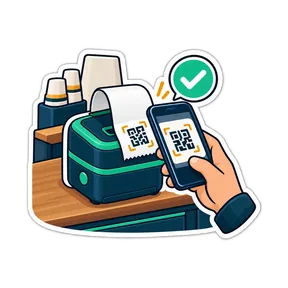
A booking page for your shop, one calendar that never double-books, reminders and checkout at the till.
Platinum and Chain plans
Learn more
Zero-middleware read-only connection (21 MCP tools including kitchen_staff_sla & recipe_stock_variance) for Claude, ChatGPT and Gemini: 1-click creekpos.mcpb bundle, portable SKILL.md and /.well-known/mcp.json discovery.
Platinum and Chain plans
Learn more
Start in your suite and move between the products your business uses.
Suite navigation and shared sign-in do not add a separate subscription. Your base plan and purchased modules determine access.
Learn more
Connect your business software and your AI tools with controlled access.
Access depends on your plan, enabled modules and granted scopes. This page describes the released allowlist; it does not promise access to every internal endpoint.
Learn more08ERP
Modules of the same account for a shop that grows into a trading or contracting business: approvals, supplier quotes, the three-way match, stock locations with transfers, batches and serials, projects billed by milestone or time, a fixed-asset register with monthly depreciation, and one view of all your companies. Exact software: only reading an invoice photo is AI.

New in CreekPOS Online
One page, Settings → Modules: switch whole modules on and off as the shop grows. One account, one login, one bill.
Every plan; the owner buys add-ons in Billing → Plan
How it works
Requests priced at the supplier's latest list, approvals by amount with two different approvers above your limit, and monthly budgets per category.
Platinum and Chain; an add-on for Retail Silver and Gold at AED 49 a month before VAT
Learn more
Ask up to eight suppliers for a price, each with its own link; compare the quotes side by side and order the best one at its prices.
Platinum and Chain; for Retail in the Procurement add-on (AED 49 a month before VAT)
How it works
The supplier's invoice is checked against the order and the delivery note: within your tolerance it is posted, outside it waits in “Invoices to check”.
Platinum and Chain; for Retail in the Procurement add-on (AED 49 a month before VAT)
How it works
What you owe each supplier by age, and how each one delivers: on time, fill rate, prices against the orders, damaged goods.
Platinum and Chain; for Retail in the Procurement add-on (AED 49 a month before VAT)
How it works
The shop floor, a back store, a central warehouse, a van: up to 50 locations with bins, min and max, counts and valuation.
Platinum and Chain; an add-on for Retail Silver and Gold at AED 49 a month before VAT
How it works
Pick by scanning, dispatch with a numbered transfer note and its QR, receive in parts; short and damaged goods are settled by a manager.
Platinum and Chain (in transit between branches: Chain); for Retail in the Warehouses add-on (AED 49 a month before VAT)
How it works
Batches keep their expiry and cost in every location, serials are received one by one, and a recall finds a batch everywhere, even on the way.
Platinum and Chain; for Retail in the Warehouses add-on (AED 49 a month before VAT)
How it works
One dashboard and a group profit and loss across up to 20 shops, with the business between your own companies removed.
Chain; invited shops on any plan can join
Learn more
Long jobs for one customer: a contract, a budget split into phases, tasks on a board and the team's hours, for contractors, fit-out firms and agencies.
Platinum and Chain; an add-on for Retail Silver and Gold at AED 49 a month before VAT
Learn more
Hours typed on the phone or Clock in / Clock out, costed at each person's pay, and a weekly timesheet to approve or send back.
Platinum and Chain; for Retail in the Projects add-on (AED 49 a month before VAT)
How it works
Invoices by milestone, progress or time and materials, with retention and advances, and the budget against what was spent, with the margin.
Platinum and Chain; for Retail in the Projects add-on (AED 49 a month before VAT)
How it works
An asset register with barcode tags, photos, places and warranties, for everything the shop owns and uses for years.
Platinum and Chain, with Books; for Retail an add-on at AED 29 a month before VAT that needs Books
Learn more
Each ended month a preview, then one journal per branch, never posted twice; sales and disposals with the gain or loss and 5 % VAT.
Platinum and Chain; for Retail in the Fixed assets add-on (AED 29 a month before VAT, needs Books)
How it works
Count a branch or a place by scanning the tags with the phone's camera: found, missing, from elsewhere or unknown.
Platinum and Chain; for Retail in the Fixed assets add-on (AED 29 a month before VAT, needs Books)
How it works
From 5.7.0 the buy-once program has purchase requests, approvals, the three-way match, supplier ageing and a Procurement home, on one PC, offline.
Gold (program) and up, version 5.7.0
How it worksThe buy-once desktop program has procurement from 5.7.0 (Gold program): requests, approvals, the three-way match and supplier ageing on one PC. Quotes by link, warehouses, groups, projects and fixed assets are online only.
09Connections
Connect Zoho Books, Xero or QuickBooks Online once and the till's days, invoices and payments arrive there by themselves; take card and wallet payments in AED with your own Paymob account; send invoices to companies as UAE e-invoices through Flick.

New in CreekPOS Online

Each day's sales journal, customers on credit, their invoices, credit notes and payments go to Zoho Books by themselves, each document once.
F&B Gold and up
Learn more
Each day's sales journal, customers on credit, their invoices, credit notes and payments go to Xero by themselves, each document once.
F&B Gold and up
Learn more
Each day's sales journal, customers on credit, their invoices, credit notes and payments go to QuickBooks Online by themselves, each document once.
F&B Gold and up
Learn more
Your own Paymob account in AED: pay online in your online shop, pay links for what customers owe, and settlements ready for Books.
Platinum and Chain; we charge nothing per payment
Learn more
Books tax invoices and credit notes to customers with a TRN go out as UAE e-invoices through Flick, with their status on the invoice.
Platinum and Chain, with Books
Learn morePlatinum and Chain. The buy-once desktop program has its own accounting export instead.
10Owner tools
Alerts on your phone, a shop you can ask — now with answers by your AI (coming soon) — a voice note every Monday (coming soon), reports anywhere, and every branch in one account.

New in CreekPOS Online

Cashier Risk & No-Sale Drawer Audit, Blind Shift Close & Cash Variance Audit, voids and big discounts reach your phone with the cashier, the till and the receipt.
From Platinum; by Telegram from Platinum
How it works
Type a question in plain English, Arabic, Hindi or Urdu — “sales today?”, “who owes me?” — and get the exact figure from your own data. It never guesses a number.
From Gold; in Telegram from Platinum
How it works
A question outside the usual list goes to your AI, which reads your own reports and says what it used: “Based on: sales report · low stock”.
AI questions a day included: Gold 20, Platinum 50, Chain 100
How it works
Every Monday morning, a one-minute spoken summary of last week in your language: sales, best day, top products, low and slow stock, and one thing to do.
Every online plan with owner alerts; off until you switch it on
How it worksAlso in this group
10Reports & phone
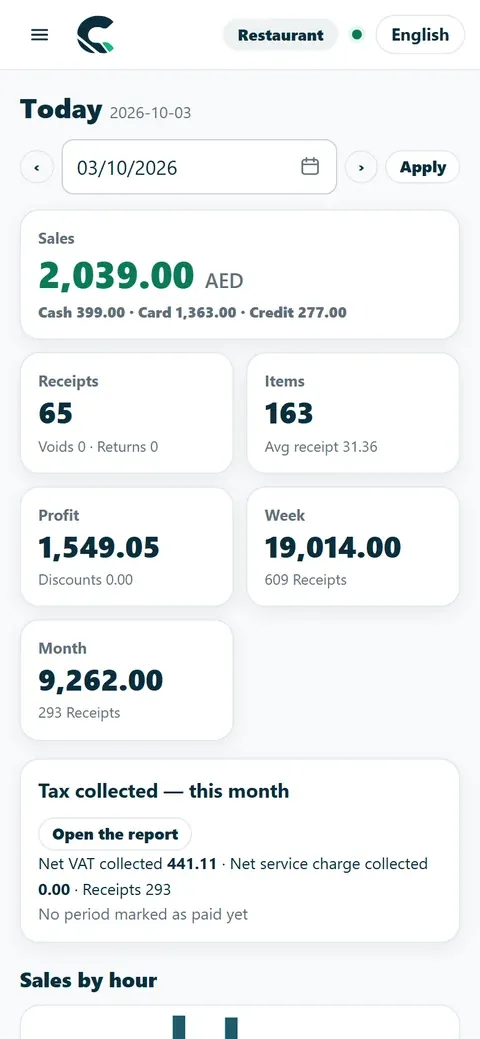
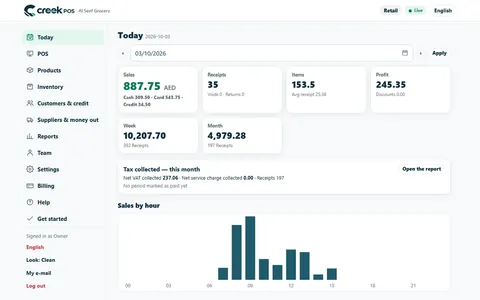
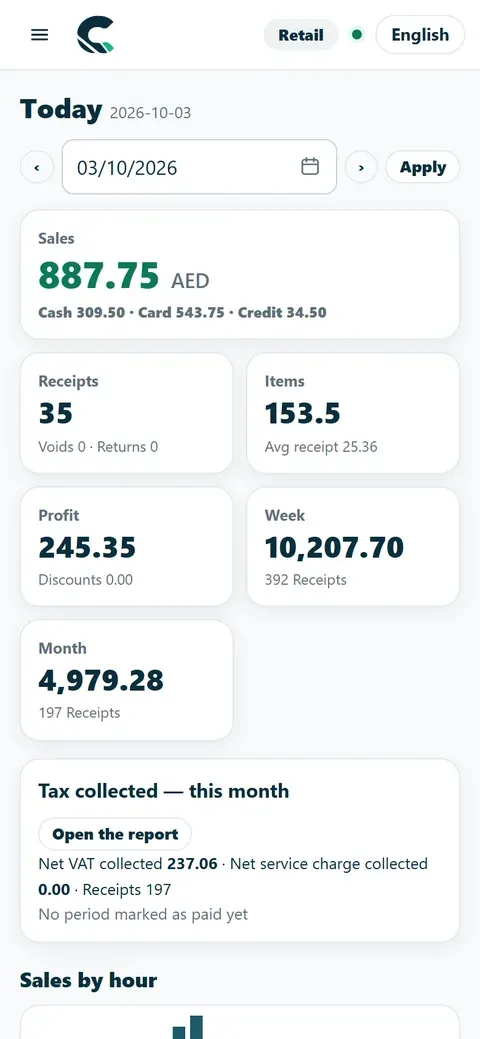
Today's sales, profit and VAT in one tap — plus Power BI live feeds and multi-format HH:mm datetime exports.
Included in Online Every plan Program Every edition · phone on Platinum
10Multi-branch
Open a second branch or central commissary without starting over: products, prices, requisitions and reports in one place.
Included in Online Retail Chain · F&B Chain

11Coming soon
In development or being integrated. We list them so you know what is next — not as features you can use today.

noon Food: live now. Delivery orders arrive on your till; your menu and stock go out to noon Food. More apps to follow.
Included in F&B Platinum and Chain, and in every 14-day trial

The online till on an Android tablet or handheld (Android 9 or newer): sells offline, prints over USB or Bluetooth, scans with the camera.
How it works
Card-terminal and QR payments taken at the till and recorded with the sale.

A self-service kiosk and scan-and-go for customers, arriving with card and QR payments.
No dates are promised: we announce each one on the blog when it ships.
Two small things that save time all day: one search box for the whole app, and a link on every error message that explains it.
Press Ctrl+K (⌘K on a Mac) or the Search button at the top of any page and start typing: a page, a setting, a receipt number, a customer, a product, a Books invoice or a booking. The arrow keys and Enter take you there.

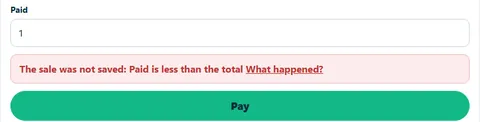
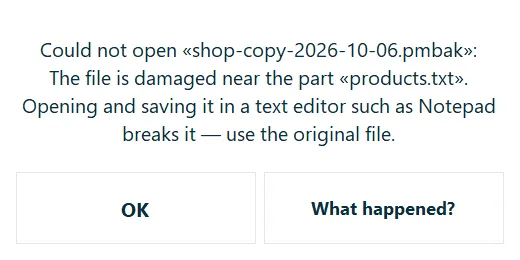
Every error message in CreekPOS carries a “What happened?” link to its own section of the troubleshooting guide: what it means, what may have happened, how to fix it, and what to send us if it still happens.
The same till and the same features. The difference is how you pay and where your data lives.
| Online vs Desktop | CreekPOS Onlinefrom AED 19 a month | CreekPOS Desktopfrom AED 350 (launch price until 31 December 2026; regular AED 466) once |
|---|---|---|
| How you pay | By the month, per shop | Once, per shop |
| The till | The CreekPOS Windows app, in Online mode | The CreekPOS program on Windows |
| When the internet drops | Keeps selling; syncs when it is back | Never needs the internet |
| Manage from your phone | Yes, from any browser | Platinum (program) |
| Backups | Automatic, every day | To USB or a folder, on a schedule |
| Updates | Automatic | When you choose; optional plan after year one |
| Registers | 2 on Gold, 4 on Platinum, up to 30 on Chain | One per licence; Platinum covers two |
| Branches | Chain | One shop |
| QR ordering and online menu | F&B Gold and up | — |
| New in October 2026 | Owner alerts, display screens, job orders, reorder and expiry, weight and volume, staff and HR, credit book, instalments and the stamp card | Not yet |
| Free trial | 14 days, no card | 14 days, every feature |
Change your mind later: one file moves products, customers and sales across, both ways.
Prices before applicable taxes.
The complete list, for when you want to check one thing.
Badges show what a feature needs; no badge means every plan of that edition. F&B Online only Desktop only Gold+ (program) Platinum (program) Optional setting
“Optional setting” marks features that are off until you switch them on in Settings → Features.

Kitchen prep SLA telemetry, waiter Ready-Bell, table QR pay, PWA digital stamp & VIP cards, BOM stock variance, hourly timers, salon & laundry tools.

Connect Claude, ChatGPT, and Gemini in one click (.mcpb & SKILL.md), track UAE AED 3M Small Business Relief & 9% tax, and stop daily margin leaks.

A fit-out, a maintenance contract or the printing for an exhibition is not a sale at the till: it lasts weeks, has a budget, a team and costs from several places. Projects in CreekPOS Online keeps each job in one place, from the contract to the last hour on site.

The coffee machine, the shelves, the van and the fit-out cost more than months of stock, yet most shops track them in a spreadsheet nobody updates. Fixed assets in CreekPOS Online keeps one register with tags, works out the depreciation month by month and posts it to Books.

A shop changes as it grows: a second outlet, a back store, an accountant, a supplier who wants quotes. In CreekPOS Online each of these is a module of the same account, switched on in one page, Settings → Modules. Nothing to install, one login, one bill.

When three people order stock for the same shop, money leaks: double orders, the wrong supplier, an urgent "just approve it" on WhatsApp. Procurement in CreekPOS Online turns that into requests priced at the supplier's list, approvals by amount and monthly budgets per category.

If your accountant works in Zoho Books, Xero or QuickBooks Online, the end of the month should not start with exporting spreadsheets from the till. Connect it once in CreekPOS Online and each day's sales, your customers on credit and their payments arrive there by themselves, each document once.
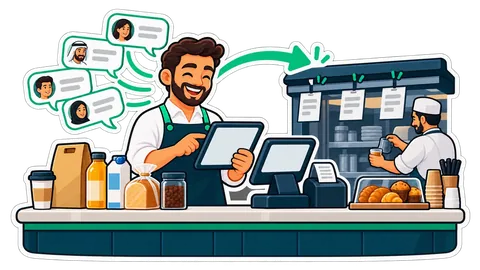
Half your orders arrive on WhatsApp while your team is busy at the counter. The AI Front Desk answers from your own menu, prices, stock and hours, reads the order back, and places it only when the customer says yes.

Ask your shop has always answered its own list of questions. Now any other question goes to your AI, which reads the shop's own reports, answers in your language, and says exactly which reports it used.

A delivery arrives with a higher carton price, the stock goes on the shelf at the old price, and the margin quietly shrinks for months. How a warning at receiving catches it, with a worked example in AED.

Happy customers rarely think of leaving a review, and a week later they have forgotten. A QR at the foot of every sale receipt asks at the right moment, in one scan, with a link you paste once.

Most small shops keep their sales in the till and their accounts in a spreadsheet, and someone retypes one into the other every month. Books puts the accounting in the same app as the till, so the sales arrive by themselves and your accountant works from the same figures.
Many owners already ask ChatGPT or Claude for help every day. Connect your AI lets that same assistant read your shop's sales, stock and receipts through a key you make, limit and revoke, and it can never sell, refund or change anything.
Try the live demo in your browser, or start a free trial — 14 days online, 14 days on the PC.
Each add-on has its own switch and team permissions. Connections use the same customer, stock and account records when the relevant modules are enabled. Cancelling an add-on keeps its records for reactivation.
Work orders, technician scheduling, equipment history and recurring maintenance.
AED 79 per workspace per month, before VAT. Separate purchase; not included in a base plan or its free trial. Buy in Billing → Plan, then enable it in Settings → Modules.
Support tickets, team assignments, response deadlines and shared knowledge articles.
AED 49 per workspace per month, before VAT. Separate purchase; not included in a base plan or its free trial. Buy in Billing → Plan, then enable it in Settings → Modules.
Internal forms with versioned fields, validated submissions and team review.
AED 29 per workspace per month, before VAT. Separate purchase; not included in a base plan or its free trial. Buy in Billing → Plan, then enable it in Settings → Modules.
Turn module events into support tickets or service orders, with optional approval.
AED 39 per workspace per month, before VAT. Separate purchase; not included in a base plan or its free trial. Buy in Billing → Plan, then enable it in Settings → Modules.
Bills of materials, work orders, consumption, output, waste and recorded costs.
AED 79 per workspace per month, before VAT. Separate purchase; not included in a base plan or its free trial. Buy in Billing → Plan, then enable it in Settings → Modules.
Equipment reservations, deposits, handovers, returns and condition reports.
AED 69 per workspace per month, before VAT. Separate purchase; not included in a base plan or its free trial. Buy in Billing → Plan, then enable it in Settings → Modules.
Saved dashboards, daily activity and CSV exports for sales and your add-ons.
AED 39 per workspace per month, before VAT. Separate purchase; not included in a base plan or its free trial. Buy in Billing → Plan, then enable it in Settings → Modules.
A private place for customers to find purchases, documents, support and service updates.
AED 69 per workspace per month, before VAT. Separate purchase; not included in a base plan or its free trial. Buy in Billing → Plan, then enable it in Settings → Modules.
Run business-to-business orders with agreed prices, pack sizes, credit controls, partial deliveries and returns, using the customers and stock you already have.
AED 129 per workspace per month, before VAT.
A shared product directory for shops and suppliers: search products, compare unit prices and delivery terms, then turn an agreed request into a purchase order.
Browsing and supplier listings: no additional module fee. Trade purchasing is a separate paid add-on.
Know who comes back, who has gone quiet, and who needs a call.
Included in Platinum and Chain. For Silver and Gold, AED 49 per month before VAT. Turn it on in Settings → Modules; buy an add-on in Billing → Plan.
From a receipt on a phone to an approved claim and a recorded reimbursement.
Included in Platinum and Chain. For Silver and Gold, AED 49 per month before VAT. Turn it on in Settings → Modules; buy an add-on in Billing → Plan.
Sell a membership, a monthly service or a regular delivery from the same customer account.
Included in Platinum and Chain. For Silver and Gold, AED 49 per month before VAT. Turn it on in Settings → Modules; buy an add-on in Billing → Plan.
Search by feature, screen or task. Open a guide and share its link with your team.