

Desktop edition — buy once

Buy it once. Sell offline. Keep your data on your PC.

The CreekPOS program on your Windows PC sells with no internet at all, prints receipts and labels, backs up to USB, and moves to a new PC with a release code. No monthly bill.

One payment per register:
  • Desktop Silver AED 699 932once Buy now
  • Desktop Gold AED 1,200 1,600once Buy now
  • Desktop Platinum (2 tills) AED 1,800 2,400once Buy now
+ 5% VAT · Launch offer: 25% off until 13 November 2026, code LAUNCH25 applied automatically.

Windows 10 or 11 · your data in files on your PC

14-day money-back on your first payment (online plan's first month/year, or a desktop licence). Refund policy

Want the shop on your phone from anywhere? See CreekPOS Online Retail

Two supermarket checkouts side by side, each with its own till, and shoppers with a trolley
The 10-minute desktop demo

Sell offline → print → back up → move to a new PC

What we show you, on a PC with the network cable unplugged.

  1. Sell offline

    No internet, ever: the program keeps its data in files on your PC.

  2. Print

    Receipts on any 58 or 80 mm thermal printer, the drawer through the printer, and barcode labels.

  3. Back up

    To a USB stick or a folder, with a daily automatic copy and a selective restore.

  4. Move the licence

    A new PC? Release the licence on the old one with a release code and activate it on the new one.

Book a 10-minute demo

Silver, Gold, Platinum

What each edition adds

  • Silver — selling, stock, suppliers, customers and credit, reports, backup
  • Gold — adds the kitchen screen and tickets, tables and bill split, sizes and add-ons, promotions, purchase orders with lots, recipes, a second linked register
  • Platinum — adds a second till licence, the shop on your phone and a daily e-mail report
  • Optional support and updates plan — never required to keep selling

The full lists are on the pricing page. All features · All plans and prices

Real screens

The till and the reports

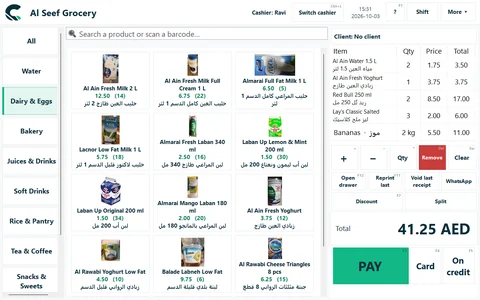
The till at Al Seef Grocery: scanned items with product pictures and a weighed line.
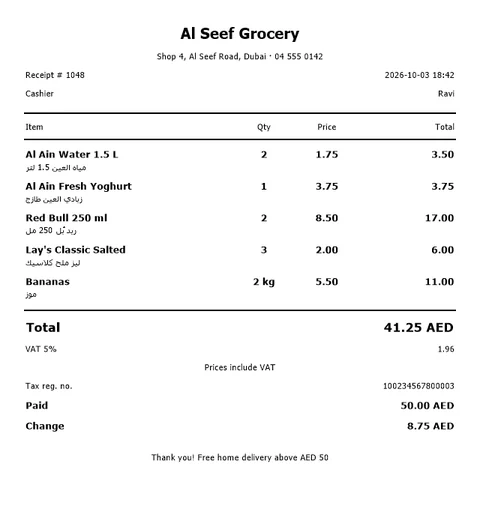
The printed receipt: English and Arabic lines, VAT 5% included, the TRN.
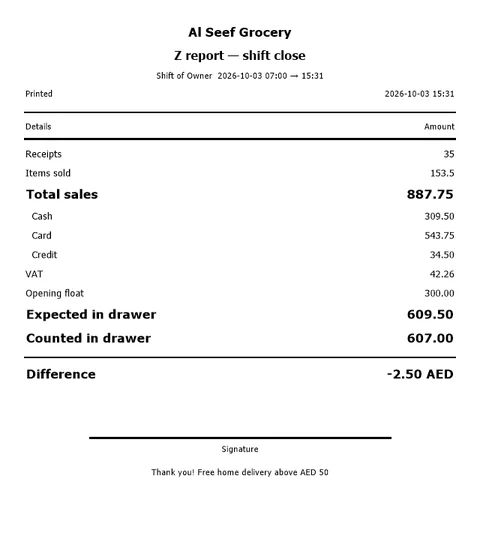
The shift's Z report: cash, card, VAT and the drawer count.
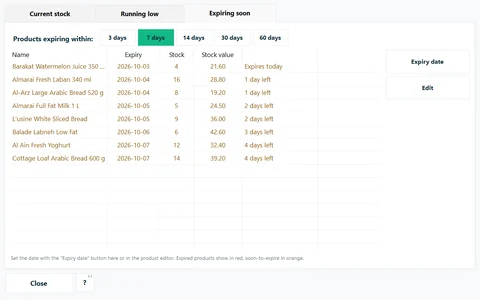
Expiring within 7 days, on the PC.
Setup

What setup includes — exactly

Included

  • A remote setup session (screen-share) with Online Retail and above
  • On-site installation with Online Chain and Desktop Platinum
  • The self-service setup guide, with every plan
  • Product import from a spreadsheet (Excel or CSV)

Quoted separately

  • On-site installation on the other plans
  • Hardware
  • Staff training

Ask for a quote on WhatsApp or by e-mail before you buy.

Behind CreekPOS

Built for UAE shops — with people you can reach

  • Ready for UAE VAT

    VAT 5% on every receipt, your TRN on every printout, simplified and full tax invoices.

  • A founder-led demo

    Your 10-minute demo is given by the people who build CreekPOS, not a call centre.

  • Support hours

    Every day 9:00–21:00 UAE time — English and Arabic; Hindi and Urdu by appointment. WhatsApp, phone and e-mail.

  • Four languages

    English, Arabic, Hindi and Urdu on the screen and on the receipt. Support in English and Arabic; Hindi and Urdu by appointment.

Book a demo

Book a 10-minute demo

We show you CreekPOS on a screen-share, with your kind of shop and in your language. Tell us when suits you; we confirm on WhatsApp.

  • 10 minutes, no obligation
  • Your shop type, your questions
  • In English or Arabic — Hindi or Urdu by appointment

Chat on WhatsApp

Answers in seconds, any time: our WhatsApp assistant replies first, and a person from our team takes over whenever you need one.

We use these details only to arrange your demo. Privacy

Desktop questions

Does it ever need the internet?

No. Only if you want to watch the shop from your phone or check for updates.

What happens when the computer breaks?

Restore the latest backup on the new PC and move the licence with a release code. If the old PC is dead, we move it on a written declaration.

Can I move to CreekPOS Online later?

Yes, with one export file — products, pictures, customers, suppliers and sales — and back again.

Hardware · FAQ · Which one is right for me?

Try CreekPOS free

CreekPOS Online free for 14 days, or the program on your PC for 7 days. Every feature, no card.

Help centre

Search by feature, screen or task. Open a guide and share its link with your team.

How to use this feature Help centre