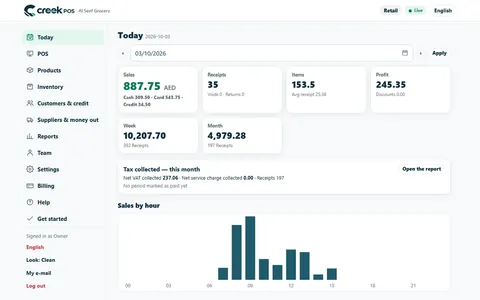
Ask your shop has always answered its own list of questions. Now any other question goes to your AI, which reads the shop's own reports, answers in your language, and says exactly which reports it used.
Coming soon: answers by your AI are not switched on yet. Ask your shop answers the questions on its own list today, with exact figures.
Imagine you run two branches, one in Sharjah and one in Ajman. It is Saturday night, and you are wondering whether the Ajman branch is still slow in the mornings or whether last week was just a bad week. You open Ask your shop and type the question the way you would ask your manager.
Until now, Ask your shop answered a fixed list of questions, such as "sales today", "best sellers this week", "what is running low" or "who owes me", with fixed rules and exact figures. A question outside that list got the help page and a few example buttons. Now it gets an answer.
How it works
Ask your shop still answers its own list first, exactly as before, with no AI involved. Any other question goes to your AI.
Your AI does not guess and does not see a copy of your database. It works with the shop's own read-only tools: sales by day, hour, cashier, branch or product, comparisons between two periods, stock, receipts, products and prices, and, where you have them on, customers who owe, bookings and the team. It picks the tools it needs, reads what they return, and writes a short answer in the language you asked in: English, Arabic, Hindi, Urdu, Malayalam or Bengali.
Under every answer it says what it used, for example:
Based on: sales report (7 Oct) · low stock
The tools only read. Your AI cannot sell, refund, change a price or stock, or delete anything. A product name or a note that looks like an instruction reaches it as data, never as an order.
It sees what you may see
Your AI asks as you. A cashier without the reports right gets no sales figures from it; a manager limited to the Ajman branch gets Ajman's figures, not Sharjah's. Every figure is the one the back office would show that same person.
Good questions to ask
Questions that would take three pages and two date pickers are where it helps most:
- "How did Ajman do in the mornings this week against last week?"
- "Which of my top 20 products are running low?"
- "Which hours brought in the most this month?"
- "Compare this month's sales with last month's, branch by branch."
- "Which customers owe me the most?"
- "How many bookings do we have tomorrow, and with whom?"
It can also explain CreekPOS itself: "How do I set quiet hours for owner alerts?"
Check the report before you act
The page says it under every AI answer, and we mean it: the answer comes from your shop's own reports, but the wording is your AI's. Before you reorder, change a price or speak to a cashier about a number, open the report the "Based on" line names and look at the figure yourself. The "Based on" line is there to make that one tap away.
Free questions a day
Each plan includes a number of free questions to your AI a day: 20 on Gold, 50 on Platinum, 100 on Chain, and 20 in the trial. Settings → Owner alerts → Your AI shows how many are used, such as "3 of 50 today · 41 this month". When the day's questions are used up, the questions on the list still answer as usual, and your AI is back the next day.
You can ask from the Ask box on the dashboard, the Ask page, the till app's Ask box and, on the plans that have it, your shop's Telegram bot.
Ask your shop or Connect your AI?
They answer from the same read-only tools, but they are different things:
- Ask your shop is built into CreekPOS. There is nothing to install and no key to make; you type a question and the answer comes from your AI inside the app, within your plan's free questions.
- Connect your AI is for owners who already use ChatGPT, Claude or another assistant and want to ask there. You make a read-only key and connect your own AI to the shop, on its maker's terms and price. See Connect your AI.
Good to know
- A question your AI answers is sent, with the report rows needed to answer it, to the AI provider named in the privacy policy, over an encrypted connection; it is not used to train their models.
- We keep the question and the usage figures for 30 days. The answer itself is not kept.
- Each person can ask up to four questions a minute.
- It does not write anything, and it does not answer from outside your shop's data.
See the AI features and the your AI chapter of the manual.
This article is general information as of its date, not legal or tax advice. Rules change; check the official source or ask your accountant before acting.