
HR · attendance · payroll

Your team's files, hours and pay, next to the sales they make

Available now in CreekPOS Online

Employee files with document expiry reminders, leave, a weekly roster, clock-in at the till, on a phone or from your fingerprint device, then payroll with payslips and the UAE WPS salary file. Made for a shop or restaurant of 2 to 50 people.

Files, leave, roster and timesheets on every online plan; payroll and WPS on Restaurant and Chain.

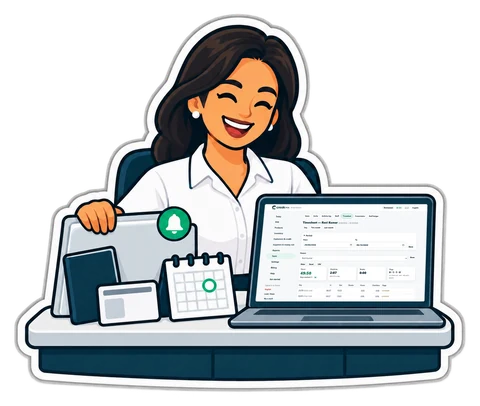
An HR manager with a laptop, ID documents and a leave calendar
  • Expiry reminders at 90, 60, 30 and 7 days
  • Attendance devices: push, LAN bridge or file
  • The WPS salary file from the final payroll
  • Labour cost as a % of sales, day by day
  • Phone self-service for payslips, attendance and loan schedules; payroll bonuses, final settlements and bank files; approved expense reimbursements can join the next payroll.

01Files

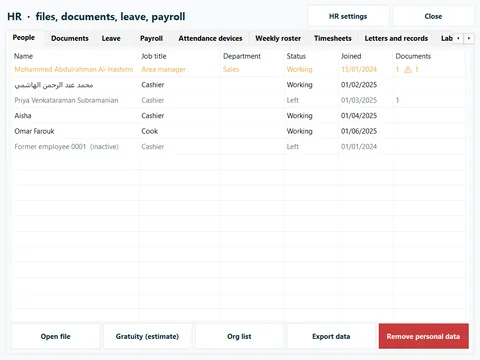
One file for each person

Job, branch, joining date, probation, nationality, contacts and an emergency contact. The pay part (bank, IBAN, WPS person ID, basic and allowances) is seen only by the owner and the people the owner allows. Someone who never uses the till can still have a file.

  • Letters from templates, checklists for joining and leaving, assets handed out, reviews and warnings
  • Export a person's data, or remove it after they have left
The team at a glance

02Documents

Documents that remind you before they expire

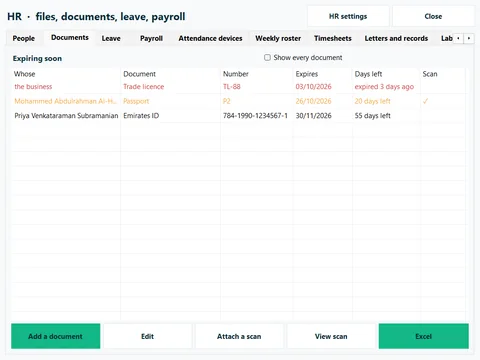
Passport, residence visa, Emirates ID, labour card, health card, insurance card, driving licence, and the shop's own trade licence and tenancy contract: each with its number, dates and an encrypted scan. The expiring-soon list and reminders at 90, 60, 30 and 7 days mean a renewal is never a surprise.

  • Reminders in the app, by e-mail or by Telegram
  • Birthdays, work anniversaries and probation ends too
Documents expiring soon, with how many days are left

03Leave

Leave, balances and holidays

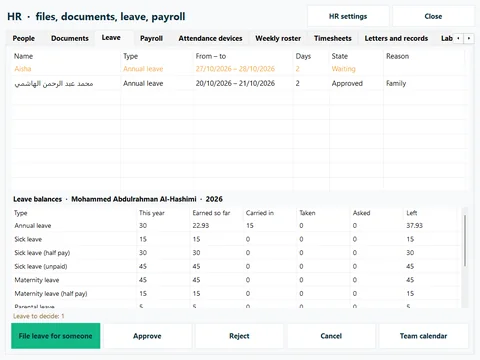
Annual, sick, maternity, parental, bereavement, hajj and unpaid leave start from UAE defaults you can change. Requests are approved in one inbox, balances count themselves (earned, carried over, taken, requested) and the team calendar shows who is off.

  • Public holidays you confirm each year
  • Half days, carry-over limits, leave paid in full, at half pay or unpaid
Leave requests and each person's balances

04Roster

The roster and timesheets

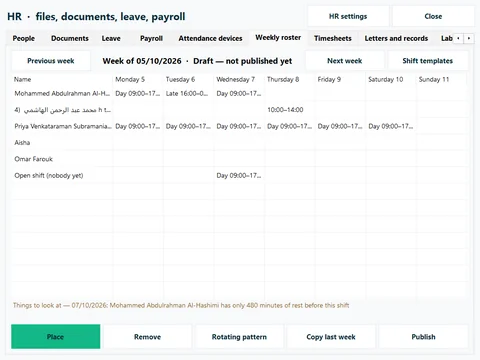
Build the week from shift templates, copy last week or lay a rotating pattern (6-1, 5-2, 2-2-3), then publish it. The roster warns about double shifts, short rest, long weeks and people on leave; it warns, it never blocks. Timesheets compare every punch with the roster and mark late, early, absent and overtime; approve and lock them before payroll.

  • Shift swaps and open shifts, decided by a manager
  • Raw minutes always shown next to rounded ones
The weekly roster
The weekly roster

05Clock-in

Clock in at the till, on a phone or at a kiosk

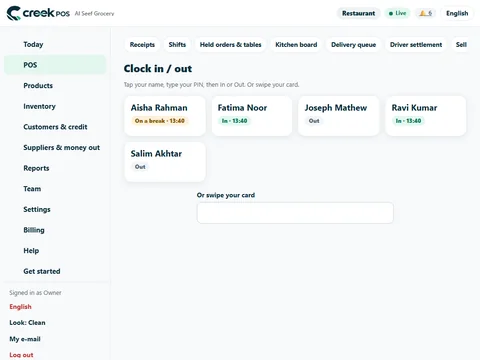
At the till, each person taps their name and types their own PIN. With phone clock-in on, staff punch from their own phone: the first punch from a new phone waits for a manager's approval, and the optional location check stores only inside or outside, never the coordinates. Kiosk mode turns a tablet at the door into a clock.

  • A private self-service link for each person: shifts, timesheet, leave, payslips and requests, with no sign-in, revocable at any time
  • Five wrong PINs lock that name for five minutes
The clock screen on the till

06Devices

Attendance devices, without the maker's software

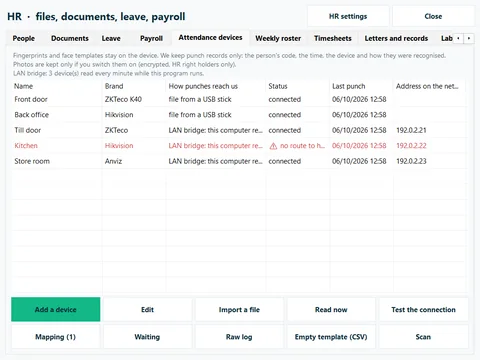
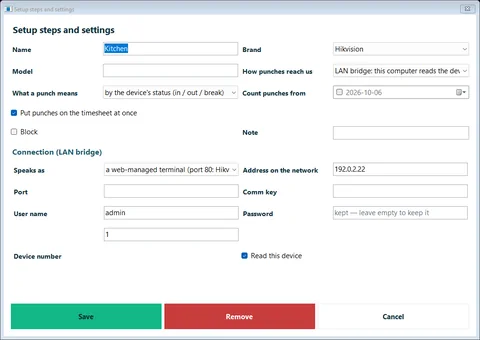
Common ZKTeco and Hikvision fingerprint and face terminals can send punches straight to CreekPOS over the internet. A terminal that cannot is read by the CreekPOS till app on the same network, the LAN bridge, every minute, and the punches are kept while the line is down. Or upload the file from the terminal's USB stick.

  • Fingerprints and faces never leave the device: only the code, the time and the method arrive
  • Unknown codes wait in a holding list; nothing is guessed
  • 2 devices on Retail, 5 on Restaurant, 20 on Chain
Devices that push, devices read over the LAN bridge, and file imports
Setting up the LAN bridge for a terminal on the shop's network
Devices that push, devices read over the LAN bridge, and file imports

07Payroll

Payroll, payslips and the WPS file

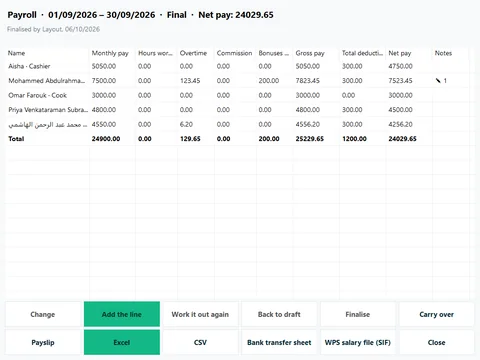
Run payroll for each branch, by the month or the week: basic and allowances, overtime from the approved timesheets, commission, tips and service charge, loans and advances taken back. Change any figure with a reason, finalise, then print or e-mail the payslips and download the bank transfer sheet and the WPS salary file (SIF) for your bank.

  • Draft, reviewed, approved, final, with an optional second person
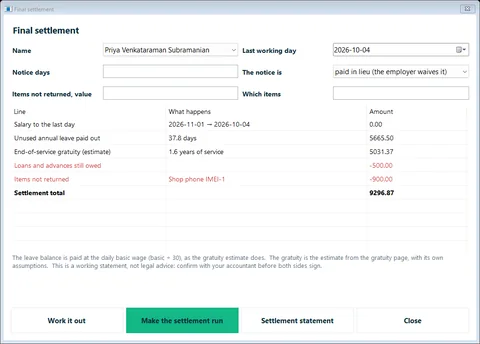
  • End-of-service gratuity and the final settlement, as estimates to confirm with your accountant or MOHRE
  • Presets for the SIF layout of the common UAE banks
A finalised payroll with its WPS salary file
A final settlement with the gratuity estimate
A finalised payroll with its WPS salary file

08Labour & sales

Labour cost against sales

For each day: scheduled and worked hours, sales, labour cost, labour as a % of sales and sales per labour hour, with a staffing suggestion from the busy hours of past weeks. Alerts when nobody has clocked in, when someone sells without clocking in, or when labour cost runs over your target.

  • Worked out from your own figures with fixed rules
Labour and sales, day by day
Plain answers

Good to know

  • Payroll is a calculator and a record, not legal or tax advice; the gratuity and leave encashment are estimates.
  • Test-upload your first WPS file with your bank before the first live payroll.
  • Attendance devices are checked with simulators and with real export files: try one terminal of your model before you buy one for every branch.
  • The buy-once desktop program has HR from Silver and payroll from Gold, without phone clock-in, self-service links or devices that push.
Which plans include it

Which plans include HR

HR comes with CreekPOS Online once Staff is on: Settings → HR.

Retail

AED99/ month

Files, documents, leave, roster, timesheets and clock-in · 2 attendance devices

Start your 14-day trial

Chain

AED300/ month

Everything in Restaurant, for every branch · 20 devices

Start your 14-day trial

Buy-once desktop program: HR from Silver; payroll and WPS from Gold

Prices exclude 5% VAT. Launch offer: 25% off until 13 November 2026, code LAUNCH25 applied automatically.

Compare all plans Read the manual chapter

Questions about HR and attendance

Do I need the maker's software for my fingerprint clock?

Not for the common ZKTeco and Hikvision models: the terminal sends its punches over the internet, the CreekPOS till app reads it on your network, or you upload its file. Try one terminal of your model with us before you roll it out.

What if my attendance device has no internet?

Use the LAN bridge: the CreekPOS till app on the same network reads the device every minute and forwards the punches, and keeps them while the line is down. Or upload the export from its USB stick.

Does CreekPOS keep fingerprints or face pictures?

No. Fingerprints and faces stay on the device. Only the employee code, the time, the device and the method arrive.

Can it make my WPS salary file?

Yes, from a finalised payroll, with presets for the common UAE banks. Do a test upload with your bank before your first live payroll.

Is the gratuity calculation official?

No. It is an estimate under the UAE labour law as published: basic salary only, 21 days a year for the first five years and 30 after, capped at two years' wage. Confirm it with your accountant or MOHRE.

Can staff clock in on their own phones?

Yes, on CreekPOS Online. The first punch from a new phone waits for a manager's approval, and the optional location check stores only inside or outside. Without a connection the phone says the punch was not recorded.

Which plan do I need?

Files, documents, leave, roster and timesheets on every online plan, with 2 attendance devices on Retail. Payroll, payslips, WPS and gratuity on Restaurant (5 devices) and Chain (20 devices).

Also built in: Books Bookings Connect your AI Features

Put this month's payroll on one screen

Start the free 14-day trial on the Restaurant plan, switch Staff and HR on in Settings and add your team.

Help centre

Search by feature, screen or task. Open a guide and share its link with your team.

How to use this feature Help centre