

Add-ons and modules: what each one is and how to switch it on
A module is a part of the app — stock, customers, Books, HR, the online shop… You switch it on or off in Settings → Modules; it costs nothing more when your plan includes it, and off only hides its pages (nothing is deleted). An add-on is a module your plan does not include, bought by the month: the owner adds it in Billing → Plan → Add-on modules and can cancel it any day.
Step by step
1Open Settings → Modules
Each module is a card with its state (On, Off), what it includes and what it needs. Included in your plan means Switch on is free. Add-on shows the monthly price and Buy the add-on. Upgrade means a higher plan has it. Sales and Till is always on.
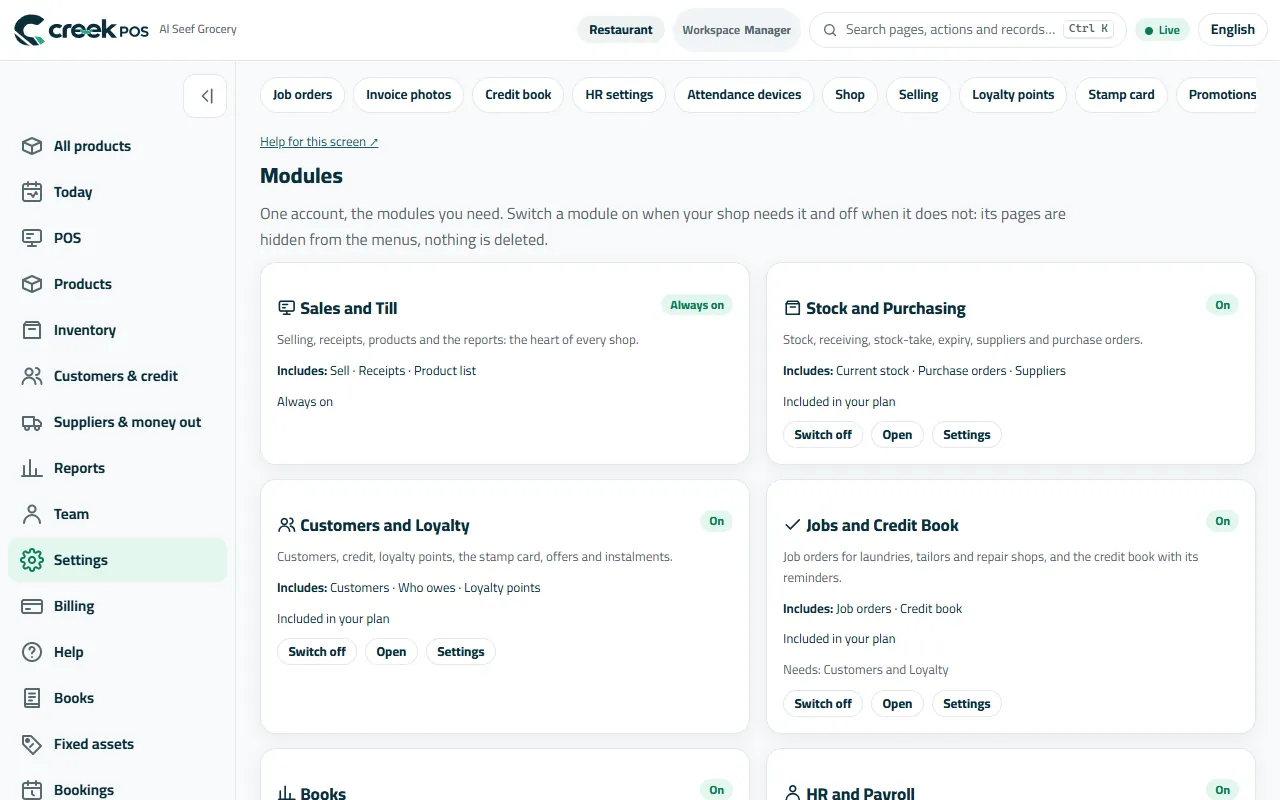
Modules: one card per module, with On / Off, Included in your plan, Add-on or Upgrade. 2Switch an included module on or off
Press Switch on: its pages appear in the menu and its settings under Settings. Some need another one first (Warehouses needs Stock and Purchasing, Fixed assets needs Books) — the card says so. Switch off hides them again; the data stays.
The same page: Switch on, Open and Settings on each card. 3Buy an add-on
Only the owner can buy. Billing → Plan → Add-on modules lists the add-ons your plan can take, with the monthly price; one bought mid-month is charged for the days left, and cancelling switches it off at once. The business type in Settings → Business type & features also decides which tools show, so the menu stays short.
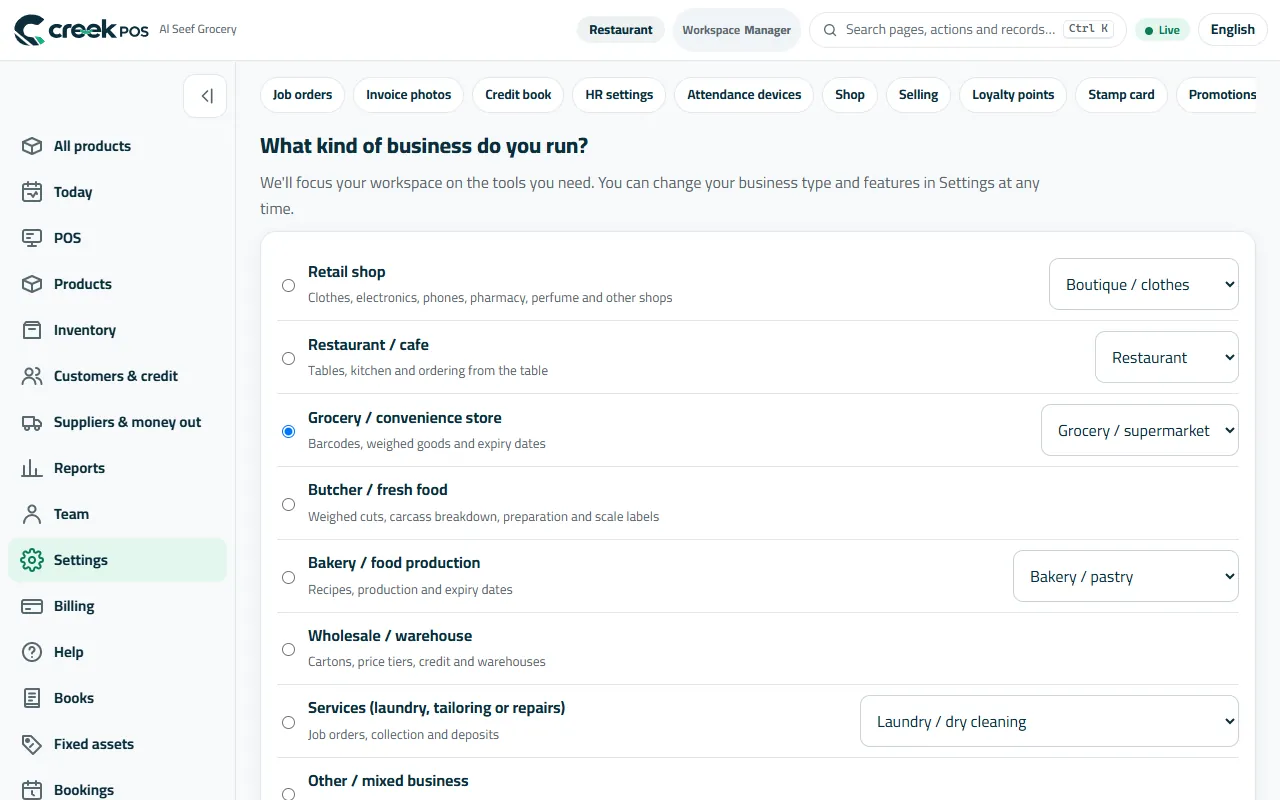
Business type: the tools of your trade show, the rest stay hidden.
Every module in one sentence
| Module | What it does | Plans |
|---|---|---|
| Sales and Till | Selling, receipts, products and the reports. | Every plan, always on |
| Stock and Purchasing | Stock, receiving, stock-take, expiry, suppliers and purchase orders. | Every plan |
| Customers and Loyalty | Customers, credit, points, the stamp card, offers and instalments. | Every plan |
| Jobs and Credit Book | Job tickets for laundries, tailors and repairs; the credit book with reminders. | Every plan |
| Online Shop, Menus and Screens | The online menu, table QR ordering, the online shop and the restaurant screens. | Included in Restaurant and Chain; add-ons on Retail (online shop AED 49, menu AED 19, table QR AED 19 a month) |
| Books | Invoices, supplier bills, the bank, VAT, profit and loss, balance sheet. | Restaurant and Chain |
| HR and Payroll | Employee files, documents, leave, roster, attendance; payroll, payslips and WPS. | Every plan (payroll: Restaurant and Chain) |
| Bookings | Appointments, the calendar and your public booking page. | Restaurant and Chain |
| Procurement | Purchase requests and approvals, supplier quotes by link, the three-way match. | Included in Restaurant and Chain; add-on on Retail (AED 49 a month) |
| Warehouses | Several stock locations, bins, transfers, batches and serials. | Included in Restaurant and Chain; add-on on Retail (AED 49 a month) |
| Projects | Long jobs with a budget, tasks, the team's time and invoices by milestone. | Included in Restaurant and Chain; add-on on Retail (AED 49 a month) |
| Fixed assets | The asset register, tag labels and monthly depreciation into Books. | Included in Restaurant and Chain; add-on on Retail once Books is there (AED 29 a month) |
| Consolidation | Several companies or branches on one dashboard and one set of group accounts. | Chain |
| Connections | Telegram, the accountant's export and feed, the e-mail reports. | Restaurant and Chain |
| AI | Ask your shop, the invoice reader, and a read-only key for your own AI. | Every plan (connect your own AI: Restaurant and Chain) |
| AI Front Desk | An assistant on your shop's WhatsApp that answers from your menu, prices and stock and takes orders you confirm. | Add-on on Restaurant and Chain (AED 99 a month), coming soon |
| Separately sold add-ons | Services and maintenance, Customer Support, Forms, Automations, Production, Rentals, Analytics, Customer Portal, Trade and wholesale — each has its own page on our site. | Bought on their own by the month, not part of a plan or its trial |
Prices are monthly and exclude 5% VAT; the pricing page and Billing → Plan always show the current ones.
The words on the screen
| On the screen | What it means |
|---|---|
| Included in your plan | Switch on is free. |
| Add-on | A paid monthly extra; Buy the add-on. |
| Upgrade | Only a higher plan has it. |
| Needs | Switch the module named there on first. |
Common mistakes
- Buying a module to try it. The modules of the plans are all in the 14-day trial — try first; only the separately sold add-ons (Services, Customer Support, Forms, Automations, Production, Rentals, Analytics, Customer Portal, Trade) are bought on their own.
- Switching a module off to “delete” its data. Off only hides it; the data stays until you switch it back on.
- Looking for an add-on in Settings → Modules on a manager's account: only the owner sees Billing.