

Expiry dates and FEFO — no more expired stock on the shelf
How a UAE grocery or café keeps expired products off the shelf with first-expiry-first-out, a receiving routine, a daily check and early markdowns, with worked numbers.
Expired stock is an ordering problem before it is a shelf problem. How to order by the numbers, mark down in time, block what has expired and measure the waste, with a worked example.
Every shop that sells food throws some of it away. The question is how much, and whether you know. Most owners guess "not much"; a month of honest records usually shows a figure worth a part-time salary. Our guide to FEFO and daily checks covers the shelf. This one covers the two ends that decide the waste: what you order and what you do in the last week of a product's life.
Over-ordering is the main cause of expired stock. A sensible order for each item comes from four numbers:
A worked example: rice sells 6 a day. You have 18, nothing on order; the supplier delivers in 2 days; you want 7 days of cover and 1 safety day; it comes in cases of 12. You need 6 × 3 + 6 = 24 to last until the delivery, so order now. How much: 6 × (2 + 7) + 6 − 18 = 42, rounded up to whole cases: 48 (4 cases).
Two limits matter for anything with a date: no more than the shelf holds, and no more than sells before a typical shelf life. If milk keeps 5 days, ordering two weeks of milk is ordering waste.
For each lot with a date, ask one question: will it sell out before it expires? If it sells 2 a day and you have 30 with 7 days left, about 16 will be left over. That is the moment to act, not the morning it expires.
Write off every expired item with its reason, and look at a waste report each month: written off versus returned, by category and by supplier. The five products you throw away most are your first five ordering decisions. The figure also tells you whether markdowns are working.
CreekPOS Online has smart reorder ("what to buy today", per supplier, each line with the reason above, into a purchase order you print, e-mail or send on WhatsApp) and expiry control (the near-expiry board with "will not sell out before expiry", markdowns you approve or put in force automatically, expired lots blocked at the till, the supplier return sheet, one-click write-off and the waste report). Both are switched on in Settings → Reorder and expiry, from the Retail plan. See retail and stock on the features page and the manual chapter.
This article is general information as of its date, not legal or tax advice. Rules change; check the official source or ask your accountant before acting.
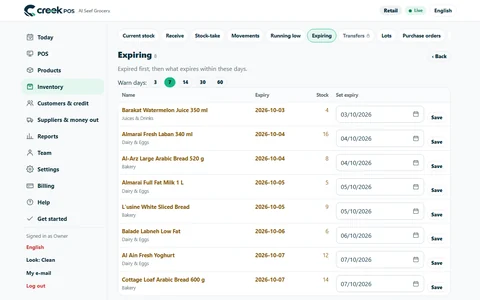
How a UAE grocery or café keeps expired products off the shelf with first-expiry-first-out, a receiving routine, a daily check and early markdowns, with worked numbers.

How to plan and run a stock-take in a small UAE shop in one evening, with zones, two-person teams, recounts and variance valued at cost, so the numbers can be trusted.
Before you run a discount, work out how many extra sales it needs to pay for itself. Promotion types, worked numbers and a checklist for UAE shops and cafés.
CreekPOS Online free for 14 days, or the program on your PC for 7 days. Every feature, no card.
Search by feature, screen or task. Open a guide and share its link with your team.