

Expiry dates and FEFO — no more expired stock on the shelf
How a UAE grocery or café keeps expired products off the shelf with first-expiry-first-out, a receiving routine, a daily check and early markdowns, with worked numbers.
How to plan and run a stock-take in a small UAE shop in one evening, with zones, two-person teams, recounts and variance valued at cost, so the numbers can be trusted.

Most owners dread the stock-take: a long night, tired staff, and a final number nobody quite believes. It does not have to be like that. A small grocery, minimarket or café store room can be counted properly in one evening if the work is planned before the first box is opened.
This article walks through a stock-take from preparation to the variance report, with the mistakes that usually spoil the result.
Your system says you have 48 bottles of a shampoo. The shelf has 41. The difference is shrinkage: theft, breakage, expired stock thrown away without a record, receiving errors and cashier mistakes such as scanning one flavour for another. Until you count, it stays invisible, and your profit report is quietly too optimistic.
A full count once or twice a year, plus small cycle counts of risky categories every month, is a sensible rhythm for a small shop. Your accountant may also want a stock value at year end.
Good counts are decided the day before:
Work in teams of two: one counts and calls out, the other scans or writes. Two people are faster than one and make far fewer mistakes.
As an example, not a statistic: a minimarket with about 2,500 products and four people in two teams can usually finish the shop floor in three to four hours if the zones are prepared.
When the counting is done, compare counts with the system before you accept anything. Do not recount everything; recount what matters:
A second team recounts those lines. Many large differences turn out to be counting errors, a box hidden behind another, or products stored in two places.
A difference in units is hard to judge. A difference in dirhams at cost tells you where to act. Here is part of a variance report, as an example, not a statistic:
| Product | System | Counted | Difference | Cost each | Variance |
|---|---|---|---|---|---|
| Shampoo 400 ml | 48 | 41 | −7 | AED 9.50 | −AED 66.50 |
| Cooking oil 1.5 l | 30 | 31 | +1 | AED 11.00 | +AED 11.00 |
| Chocolate bar | 120 | 104 | −16 | AED 1.80 | −AED 28.80 |
| Water 6 × 1.5 l | 20 | 18 | −2 | AED 8.00 | −AED 16.00 |
| Total | −AED 100.30 |
Positive differences matter too. Extra cooking oil usually means a delivery was sold before it was received, or a similar product was scanned instead.
A stock-take is only as good as the numbers it is compared against. In CreekPOS the count is done by scanning, including from several phones at once using the phone camera as a scanner, so two or three teams count different zones at the same time. You review the differences, apply the count, and the variance is saved at cost with the date. Pack units and pack barcodes keep cases and single bottles straight, and the stock list prints for paper zones. See the inventory features and, for short-life stock, expiry dates and FEFO.
How often should a small shop count? A full count once or twice a year, plus monthly cycle counts of high-risk categories.
Can I keep selling during the count? It is possible with care, but every sale changes the numbers. A closed shop or a very quiet evening gives the cleanest result.
What is a normal amount of shrinkage? It varies by shop and category. Track your own figure count after count; the trend matters more than any benchmark.
Should staff who work the counter count their own zones? It is better to mix teams, so nobody checks only their own work.
Want to see a stock-take from a phone before your next count? Open the demo grocery or start a 14-day trial with your own product list.
This article is general information as of its date, not legal or tax advice. Rules change; check the official source or ask your accountant before acting.
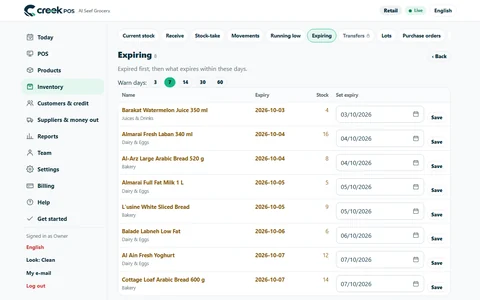
How a UAE grocery or café keeps expired products off the shelf with first-expiry-first-out, a receiving routine, a daily check and early markdowns, with worked numbers.
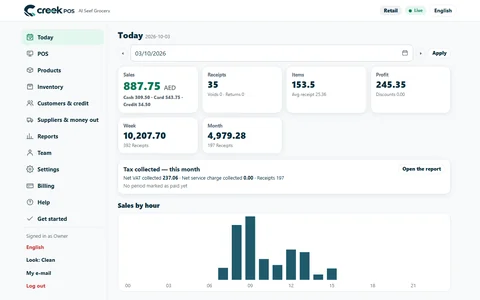
A ten-minute closing routine for a small UAE shop or café: sales, margin, average receipt, the drawer, discounts and stock alerts, in the same order every day.

A month-end pack for a small UAE shop or café: which reports and documents your accountant needs, what to reconcile first, and a timeline that keeps VAT returns calm.
CreekPOS Online free for 14 days, or the program on your PC for 7 days. Every feature, no card.
Search by feature, screen or task. Open a guide and share its link with your team.