

A stamp card that needs no app
Paper stamp cards get lost and copied; loyalty apps never get downloaded. A stamp card that lives on the customer's phone through a link, filled automatically from the till, keeps the simplicity and drops the problems.
Coming soon
The stamp card already lives on a page the customer opens from the receipt. Now it can go into the phone's wallet, next to the bank cards, and it updates itself after every visit.

Coming soon: the Apple Wallet and Google Wallet buttons are not switched on yet. The stamp card itself works today on its card page, with no app.
Imagine a karak café in Deira. The morning regulars come every day on the way to work: one karak, sometimes two, a chapati on Fridays. The café runs a stamp card, "buy nine, the tenth is free", and it works, as long as the customer can find it. The card page is somewhere in the phone's browser tabs, or in a WhatsApp message from three weeks ago.
The one place on a phone that people open without thinking is the wallet: it is where the bank card, the boarding pass and the cinema ticket live. That is where the stamp card belongs.
The stamp card already works without an app (see a stamp card that needs no app). The customer scans the QR printed under the stamps line on the receipt ("Stamps: 4 of 9"), and the card opens on the phone: the shop's logo and name, the stamps as filled and empty circles, the reward, the rule, and the code the cashier scans.
Under the card, two buttons:
The pass shows the stamps, the points balance when your loyalty points are on, the reward, the rule, the code as a QR, and a link back to the card page. It wears your shop's name, logo and colour, in your online shop's language.
The customer never refreshes anything. After each sale that earns a stamp, the pass updates itself in the background: 5 of 9, 6 of 9, then "reward ready". Giving the reward at the till updates the pass too. A return or a void takes the stamps back on the pass as it does on the card.
At the counter, the customer opens the wallet and shows the pass; the cashier scans the code, exactly as with the card page.
There is nothing to download and no account to make. The card's link is a long secret code: nothing of the customer's phone number or name is in it. The stamps are kept at the shop, on the customer's card, so a lost phone or a deleted pass loses nothing; the cashier finds the customer and the card is still there.
You set nothing up for the wallet: the buttons appear on the card page once wallet passes are switched on for CreekPOS, for every shop with the stamp card on.
The buy-once desktop program gains the stamp card itself in the Gold package and up: the same rules (stamps per visit or per item, how many fill the card, the reward, an expiry), the stamps on the member button, Give the reward at the till, and the receipt printing "Stamps: 5 of 9" and "Reward ready: a free karak". The desktop has no public card page, so there is no link and no wallet pass there.
In CreekPOS Online, the stamp card and the wallet buttons come with the plans that have loyalty, from Retail up.
See the stamp card in the wallet on the e-receipt page, the stamp card in the manual and the earlier post a stamp card that needs no app.
This article is general information as of its date, not legal or tax advice. Rules change; check the official source or ask your accountant before acting.
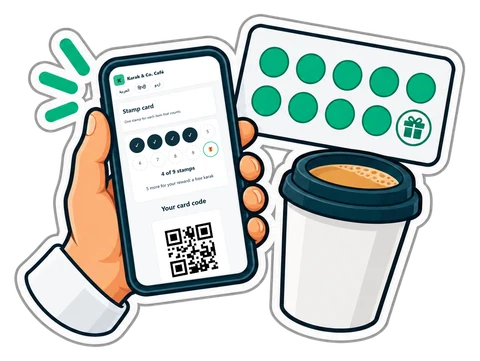
Paper stamp cards get lost and copied; loyalty apps never get downloaded. A stamp card that lives on the customer's phone through a link, filled automatically from the till, keeps the simplicity and drops the problems.

A latte in three sizes with four milks and five syrups is sixty products if you do it wrong, and one product with two option groups if you do it right. A practical way to build a café menu on the till.
Before you run a discount, work out how many extra sales it needs to pay for itself. Promotion types, worked numbers and a checklist for UAE shops and cafés.
CreekPOS Online free for 14 days, or the program on your PC for 7 days. Every feature, no card.
Search by feature, screen or task. Open a guide and share its link with your team.