

Discount caps and approvals: stop discounts leaking your margin
Small counter discounts add up fast. How much a discount really costs, where it leaks, and how a cap per role with quick manager approval keeps your margin intact.
Voids, big discounts, a short drawer, a drawer opened with no sale: the few events worth knowing about, how to get them on your phone without drowning in messages, and what to do when one arrives.

Most owners cannot stand behind the counter all day. You have suppliers to meet, a second branch, a family. The shop keeps running, and almost always it runs well. The problem is the "almost": a void that was not a mistake, a discount nobody approved, a drawer that is short at the end of the shift. You usually find out days later, if at all.
This guide is about knowing the few things that matter, the moment they happen, without spending your evening reading reports.
A till records hundreds of actions a day. Only a handful point to a problem, and they are the same in most shops:
None of these proves anything on its own. A void is usually a cashier fixing a mistake. What matters is seeing them, and seeing the pattern.
The first instinct is "send me everything". After two busy days you mute it, and then you see nothing. A better set-up:
One void means nothing. Four voids by a cashier who usually has none, on a day when her discounts were 17 % of sales instead of 2 %, is worth a quiet word. The useful daily question is not "what happened?" but "what was unusual for this person?".
In CreekPOS Online, owner alerts are switched on in Settings → Owner alerts, where you choose the events, the amounts, quiet hours and the mode (serious ones at once, the rest hourly, by default). Alerts appear on a bell in the back office and on an alerts page you can filter, mark as reviewed and export; they can also go to your e-mail and, from the Restaurant plan, to your shop's Telegram bot. A sale made while a till was offline raises its alert when it syncs, with the time it really happened. The daily summary gets a "Needs a look" block that compares each cashier's day with their usual one.
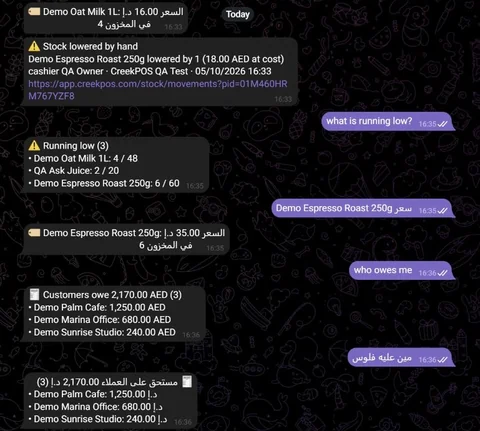
The same page switches on Ask your shop: type "sales today" or "who owes me" in plain words and get the exact figure from your own data. See the owner tools on the features page and the manual chapter. Alerts are available from the Retail plan.
This article is general information as of its date, not legal or tax advice. Rules change; check the official source or ask your accountant before acting.
Small counter discounts add up fast. How much a discount really costs, where it leaks, and how a cap per role with quick manager approval keeps your margin intact.
A shift routine that makes the cash drawer and the card terminal agree with the till every night. Opening float, cash in and out, the Z report and a worked drawer count.
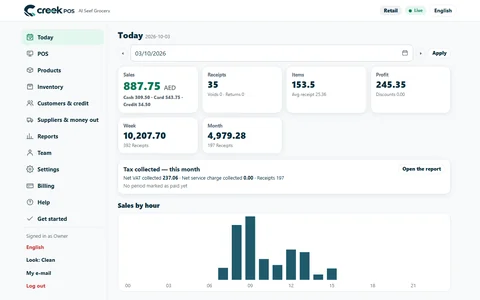
A ten-minute closing routine for a small UAE shop or café: sales, margin, average receipt, the drawer, discounts and stock alerts, in the same order every day.
CreekPOS Online free for 14 days, or the program on your PC for 7 days. Every feature, no card.
Search by feature, screen or task. Open a guide and share its link with your team.