

Cash and card shifts — opening float, Z report and the drawer count
A shift routine that makes the cash drawer and the card terminal agree with the till every night. Opening float, cash in and out, the Z report and a worked drawer count.
A ten-minute closing routine for a small UAE shop or café: sales, margin, average receipt, the drawer, discounts and stock alerts, in the same order every day.
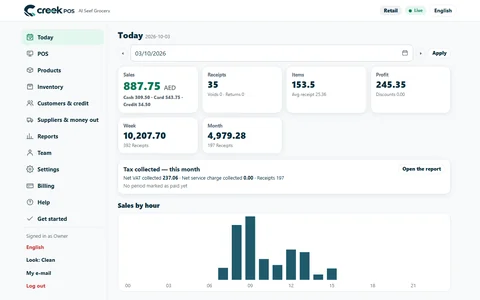
Most owners either never open the reports their till produces or lose an hour scrolling through them. Neither helps. A short, fixed routine at closing time — the same numbers in the same order — tells you in ten minutes whether the day was normal and, if it was not, exactly where to look.
Numbers only mean something next to other numbers. One day's sales of AED 4,850 tells you nothing; the same figure next to your last four Tuesdays tells you a lot. Reading the same reports in the same order trains your eye, so an odd figure jumps out without any calculation.
Ten minutes is also short enough to survive a busy week. A routine that needs an hour gets skipped in Ramadan, in the summer rush or the week a cashier is on leave — exactly when problems start.
Run this after the last shift is closed, from the till or from your phone.
That is the whole routine. Anything unusual gets one line in a notebook or a note on your phone, and you investigate the next morning when you are not tired.
A baqala on a Tuesday, compared with the average of its previous four Tuesdays. These figures are an example, not a statistic.
| Number | Today | Usual Tuesday | How to read it |
|---|---|---|---|
| Sales | AED 4,850 | AED 5,200 | 7% down — within a normal swing |
| Receipts | 312 | 330 | Fewer customers, in line with sales |
| Average receipt | AED 15.54 | AED 15.76 | Basket size steady |
| Gross margin | 21% | 22% | Slightly lower — check below |
| Discounts | AED 180 | AED 60 | Three times usual — look closer |
| Drawer difference | AED −35 | about ±5 | Short — look closer |
| Returns | 2 | 2 | Normal |
The sales dip is not the story; the discounts and the short drawer are. The next step is the receipt list filtered by cashier for the evening shift, looking for large discounts, receipts voided after payment, or a cash sale entered as card. Most of the time the answer is innocent — a regular's bulk order, a mistake at change-giving — but you only find out by looking the same day.
A UAE shop has strong rhythms, and comparing across them produces false alarms:
A one-line note on unusual days ("rain", "building water cut", "new competitor opened") saves you puzzling over the same figure months later.
Profit figures are only as good as the cost prices behind them. If a third of your products have no cost entered, the margin on the screen is a guess, so filling in costs is worth an afternoon.
The daily check is about exceptions. Once a week, look at profit per product and slow movers: what earns its shelf space, what ties up cash. Once a month, add expenses to reach a net profit and prepare the pack for your accountant — see month-end with your accountant. For the cash side of closing, the routine in cash and card shifts pairs well with this one.
The reports screen opens on tiles for sales, profit, receipts, items and average receipt for any period, with best sellers and busy hours by product, day, hour and category, profit per product, and a receipt list you can filter by cashier. The Z report shows the drawer count by cashier, and the running-low and expiring-soon lists cover the stock step. The owner dashboard works on the phone, and a daily summary can arrive by e-mail or Telegram at closing. All of it is on the features page.
Do I need to read reports every single day? For the ten-minute check, yes — it is the habit that makes problems small. The deeper weekly and monthly reviews can wait for a quiet hour.
What if one day looks bad? One day is noise; two or three in a row on the same weekday is a pattern. Note it, then compare with the next few days before acting.
Should I compare with last year? When you have the history, yes, especially for Ramadan and summer. Until then, compare with recent weeks.
Who else should see the numbers? A trusted manager can run the same routine on your day off; the accountant gets the monthly summary, not the daily one.
Want to see what these tiles look like on a working shop? Open the live demo of a demo grocery, or start a 14-day trial with your own products.
This article is general information as of its date, not legal or tax advice. Rules change; check the official source or ask your accountant before acting.
A shift routine that makes the cash drawer and the card terminal agree with the till every night. Opening float, cash in and out, the Z report and a worked drawer count.

Small counter discounts add up fast. How much a discount really costs, where it leaks, and how a cap per role with quick manager approval keeps your margin intact.

A month-end pack for a small UAE shop or café: which reports and documents your accountant needs, what to reconcile first, and a timeline that keeps VAT returns calm.
CreekPOS Online free for 14 days, or the program on your PC for 7 days. Every feature, no card.
Search by feature, screen or task. Open a guide and share its link with your team.