

A stock-take that adds up — counting the shop in one evening
How to plan and run a stock-take in a small UAE shop in one evening, with zones, two-person teams, recounts and variance valued at cost, so the numbers can be trusted.
Typing a 25-line supplier invoice into stock takes twenty minutes and invites mistakes. What an AI reader does well, where it can be wrong, and the checks that keep your stock and costs right.

Every delivery ends the same way: a paper invoice, sometimes a crumpled thermal one, sometimes half in Arabic, and someone who has to type it into the stock. Twenty-five lines, cartons into pieces, the VAT, the supplier's name for a product that is not your name for it. It takes twenty minutes, and a wrong cost on one line spoils your margins for months.
Reading a messy document is exactly what modern AI models are good at. Checking sums is exactly what they should not be trusted with. A good invoice reader uses each for what it does well.
You photograph the invoice (or choose a photo or PDF). An AI model reads it and returns what it sees: the supplier, the invoice number and date, and every line with its description, barcode if printed, quantity, unit and price, plus the VAT and the total. Handwriting, thermal paper, two languages on one page: it reads what a person could read.
Everything that must be exact is done by ordinary code:
A faded photo, a folded corner, two invoices in one picture. That is why the review screen shows the photo beside the lines, zoomable, and why the totals check exists: a misread number almost always breaks a sum, and the software tells you where.
Photograph flat, in good light, the whole page. Add the next page for long invoices. Check the amber lines, not every line. After two or three invoices from the same supplier, most lines arrive green, because the program has learned what that supplier calls your products.
AI invoice reading is in pilot — ask us to switch it on for your shop. A few readings a month are included in paid plans, and you can try 2 during the trial. It is in CreekPOS Online, under Inventory → Invoice from a photo. See AI where it helps on the features page and the manual chapter.
This article is general information as of its date, not legal or tax advice. Rules change; check the official source or ask your accountant before acting.

How to plan and run a stock-take in a small UAE shop in one evening, with zones, two-person teams, recounts and variance valued at cost, so the numbers can be trusted.

A month-end pack for a small UAE shop or café: which reports and documents your accountant needs, what to reconcile first, and a timeline that keeps VAT returns calm.
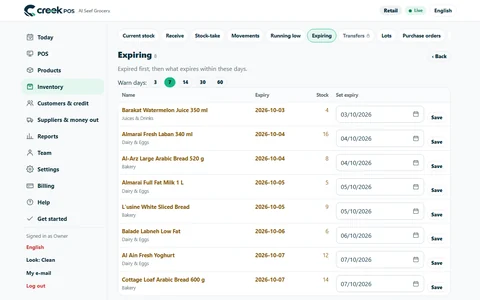
How a UAE grocery or café keeps expired products off the shelf with first-expiry-first-out, a receiving routine, a daily check and early markdowns, with worked numbers.
CreekPOS Online free for 14 days, or the program on your PC for 7 days. Every feature, no card.
Search by feature, screen or task. Open a guide and share its link with your team.