

Monthly accounts and regulars: credit without the notebook
The baqala monthly account keeps regulars loyal, but a notebook loses money. How to set credit rules and limits, record sales and repayments, and collect at month end.
Monthly accounts keep regular customers loyal, and quietly eat a shop's cash. A credit book with terms, limits, ageing, statements and polite reminders turns "write it down" into money that comes back.

"Write it down, I'll pay at the end of the month." Every baqala, cafeteria and pharmacy in the UAE hears it every day. Selling on account is how a neighbourhood shop keeps its regulars. It is also how shops end up with thousands of dirhams spread over notebooks, family members and promises.
The problem is rarely that customers refuse to pay. It is that nobody knows exactly who owes what, since when, and who was reminded last.
Tell regular customers the rules once, politely. Most are relieved to know where they stand.
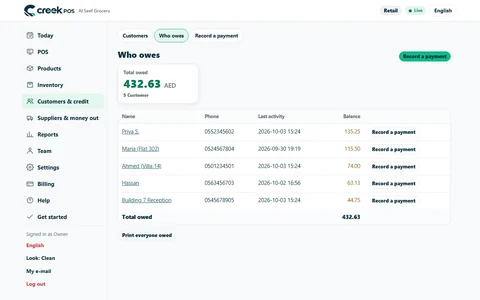
Every sale on account should be a real sale, with a receipt and VAT, on the customer's account. Every payment — cash, card, bank transfer — is recorded against the account, oldest bill first. The credit book then answers four questions at a glance:
Look at it every Saturday morning. The over-60 column is where money is lost; deal with it first.
Disputes start when the customer cannot see the lines. A private statement link, sent by WhatsApp or e-mail, shows each purchase and payment with dates and the balance. It opens on their phone, shows nothing about anyone else, and you can withdraw it at any time.
Reminding people about money is uncomfortable, so it does not happen until it is too late. Let the system prepare the reminders and keep you in control:
E-mails can go by themselves. WhatsApp reminders wait in a list for the cashier, who taps once per customer and sends from the shop's own phone. You decide every message.
Sometimes the honest answer is a plan. Turn the balance into a few dated payments — see instalments and deposits — rather than letting it grow.
The credit book and reminders are in CreekPOS Online from the Retail plan: switch them on in Settings → Credit book, set terms, limits (warn or block, offline too) and your payment details, then use Customers → Credit book, Customers → Reminders to send and Reports → Collections. See the manual and our older article on customer accounts and regulars. Customer accounts themselves are in every plan and in the desktop program.
This article is general information as of its date, not legal or tax advice. Rules change; check the official source or ask your accountant before acting.
The baqala monthly account keeps regulars loyal, but a notebook loses money. How to set credit rules and limits, record sales and repayments, and collect at month end.
A baqala is not a small supermarket. It sells to the same families every day, on account, by phone and by the kilo, from a counter one metre wide. A checklist built around that counter.

Taking a deposit or letting a customer pay over three months is normal business in the UAE, and a common source of confusion. A simple way to do both at the till, with every due date in one place.
CreekPOS Online free for 14 days, or the program on your PC for 7 days. Every feature, no card.
Search by feature, screen or task. Open a guide and share its link with your team.