

Reading your daily reports in ten minutes
A ten-minute closing routine for a small UAE shop or café: sales, margin, average receipt, the drawer, discounts and stock alerts, in the same order every day.
Available now in CreekPOS Online
A trial with no products and no sales has nothing to show you. One click fills your shop with a realistic sample of its own kind, from products to 25 days of receipts, and one click takes exactly that sample out before you add your own.

Imagine you run a small café in Al Nahda and you have just started a trial. You open the dashboard: no sales. The reports: empty. Low stock: nothing. Who owes: nobody. Everything you wanted to judge needs data, and the only way to get data is to type in your products, sell for a few weeks and come back. Most owners judge the software on empty screens, or give up on the second day.
Sample data fixes that with one click.
The sample matches your kind of shop, from the shop type you chose when you set up: a grocery or baqala, a café (also a canteen or a roastery), a restaurant, a pharmacy, or a clothes shop (also a boutique, a tailor or a perfume shop). A UAE shop gets UAE product names in English with Arabic alternatives (Arabic first if your shop works in Arabic) and prices in AED.
One click writes:
Sample receipts carry their own numbers, starting with SAMPLE0, so you can always tell them apart. Your shop's own receipt numbers do not move: the first real receipt is still number one.
When you have seen enough, Remove sample data takes out exactly what the sample put in, and nothing else: the products, stock, customers, suppliers, cashiers, receipts, shifts and costs that carry the sample's mark. The categories it added go too, unless you have put a product of your own in one. Pictures that nothing uses any more are released from your plan's picture space.
What you made yourself stays: a product you added, a customer you typed in, a supplier, a real sale. The getting-started checklist never counts the sample either, so "Add the first product" still waits for a product of your own.
The best order: try with the sample, remove it, then add your own products from the catalogue, a spreadsheet or by hand, and open.
See sample data on the features page and the sample data chapter of the manual.
This article is general information as of its date, not legal or tax advice. Rules change; check the official source or ask your accountant before acting.
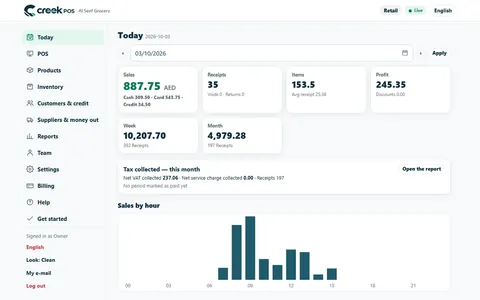
A ten-minute closing routine for a small UAE shop or café: sales, margin, average receipt, the drawer, discounts and stock alerts, in the same order every day.
Many shops already have their products, prices and customer balances in a spreadsheet. With an hour of tidying and a careful import, that file becomes a working till before lunch. A plan, hour by hour.
Moving from an old cash register, a notebook or an Excel sheet to a POS takes one weekend if the product list is ready first. A two-day plan for UAE shops.
CreekPOS Online free for 14 days, or the program on your PC for 14 days. Every feature, no card.
Search by feature, screen or task. Open a guide and share its link with your team.